
How to Test Your Analytics Agent ?
Ju Data Engineering Weekly - Ep 99

Bonjour!
I’m Julien, freelance data engineer based in Geneva 🇨🇭.
Every week, I research and share ideas about the data engineering craft.
Not subscribed yet?
This is the fourth episode of our chat-BI series with nao.
Quick recap.
Post 1: We explored a modern approach to chat-BI, using the filesystem to store and serve context to the model.
Post 2: We stress-tested that setup on real benchmarks (BIRD + DABStep).
Post 3: We reran those benchmarks with a semantic layer and showed how it reduces ambiguity.
In this post, I’ll deep dive into how nao tests an analytics agent.
The team has iterated a lot over the past few months and gathered some really interesting insights into what it takes to test agent frameworks.
Let’s go.
Testing Agent != Testing SQL
In the previous posts of this series, we ran chat-BI agents on real benchmarks.
We saw agents can fail—not because of bad SQL syntax, but because of misinterpretation:
They misread metric definitions.
They answered questions that had no answer in the data.
They missed basic business conventions.
If you want to reduce these errors, you need to measure them systematically.
The obvious solution is to compare SQL:
Give it a prompt
Pick an expected SQL query
Compare the two
But here’s the problem:
An agent can issue multiple queries, structure them differently (different CTEs, different aliases), or reach the same answer through different intermediate steps.
Sometimes it won’t even return SQL at all—it might return plain text, a table, or a chart.
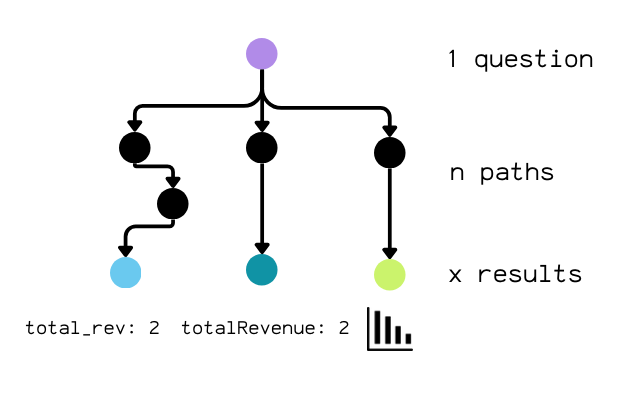
So the real challenge isn’t validating the process (“did it write my SQL?”).
It’s validating the outcome: did it get the right answer, while keeping the freedom to reason its own way?
nao testing framework
To support this non-deterministic agent behavior and still ship BI agents with real control, nao built its own testing framework.
The setup is simple.
You define test cases as small YAML files in a tests folder. Each file contains a name, a prompt, and a validation query (SQL) used to compute the expected result:
name: total_revenue

prompt: What is the total revenue?

sql: SELECT SUM(amount) AS total_revenue FROM payments;
That validation SQL is not there to compare against the agent’s SQL. It’s there to compute the golden result set.
You’re not testing “did you write this SQL?”
You’re testing “did your answer match this data?”
When you run nao test, here’s what happens:
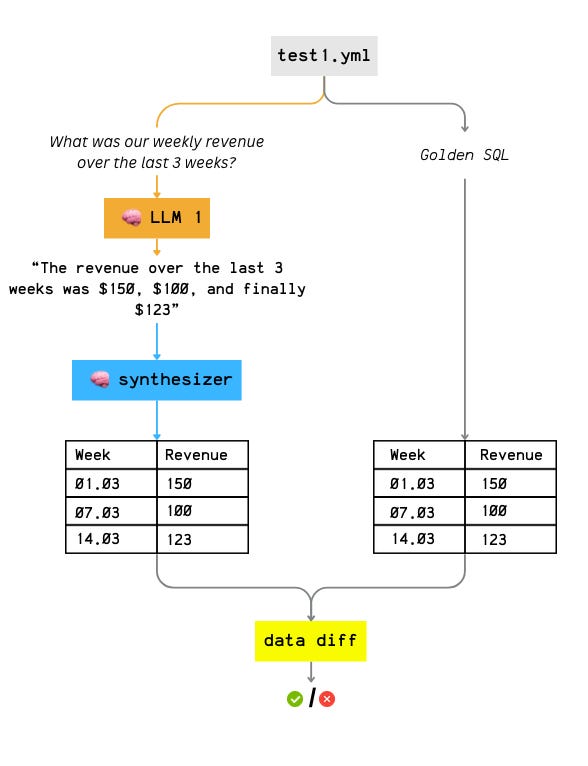
nao sends each YAML test case to a specific LLM. Then it:
collects the agent’s answer
normalizes it with a synthesizer (more on that below) which converts the answer into a structured list of records and sorts it consistently by rows and columns
compares it to the golden result produced by the validation SQL
Furthermore, each run is logged as a single JSON artifact with everything you need to debug later: transcript, tool calls, SQL queries, intermediate outputs, and token usage.
Because this is standardized, you can scale evaluation easily across many test cases and across multiple LLM providers.
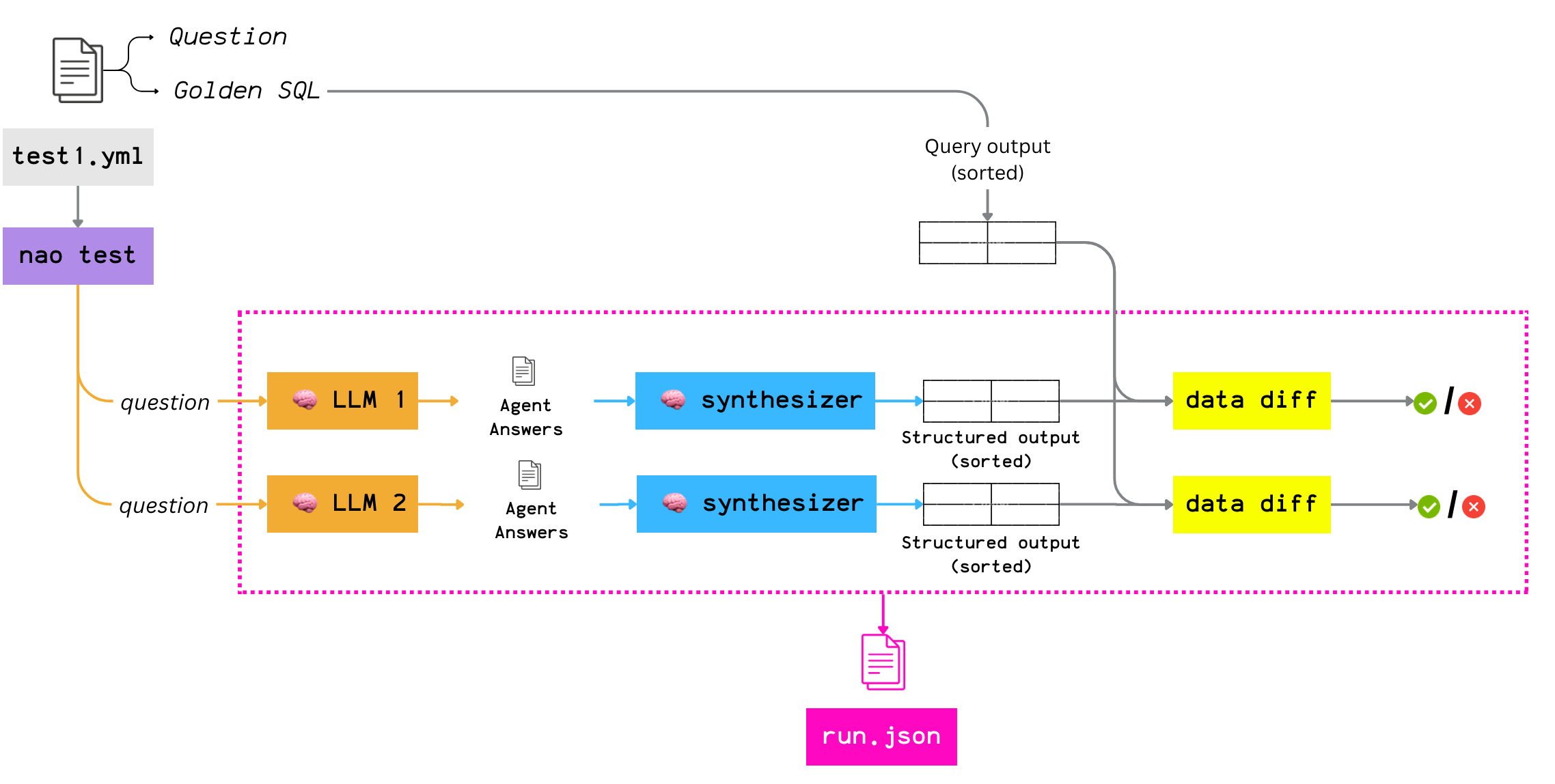
A few details that matter:
Runs are isolated: the agent does not know about how his answer will be evaluated
Concurrent execution: multiple models × multiple tests can run in parallel.
Cost visibility: for some warehouses (e.g., BigQuery), nao can capture query cost in addition to token cost, so you can track the full cost of an agent run.
Synthesizer LLM
This is where most people expect a simple SQL comparison.
nao does something different.
After the agent completes its full loop, nao takes the full conversation transcript and sends it to a second LLM: the synthesizer.
The synthesizer’s job is simple: extract the agent’s final answer into a structured format that matches the expected schema.
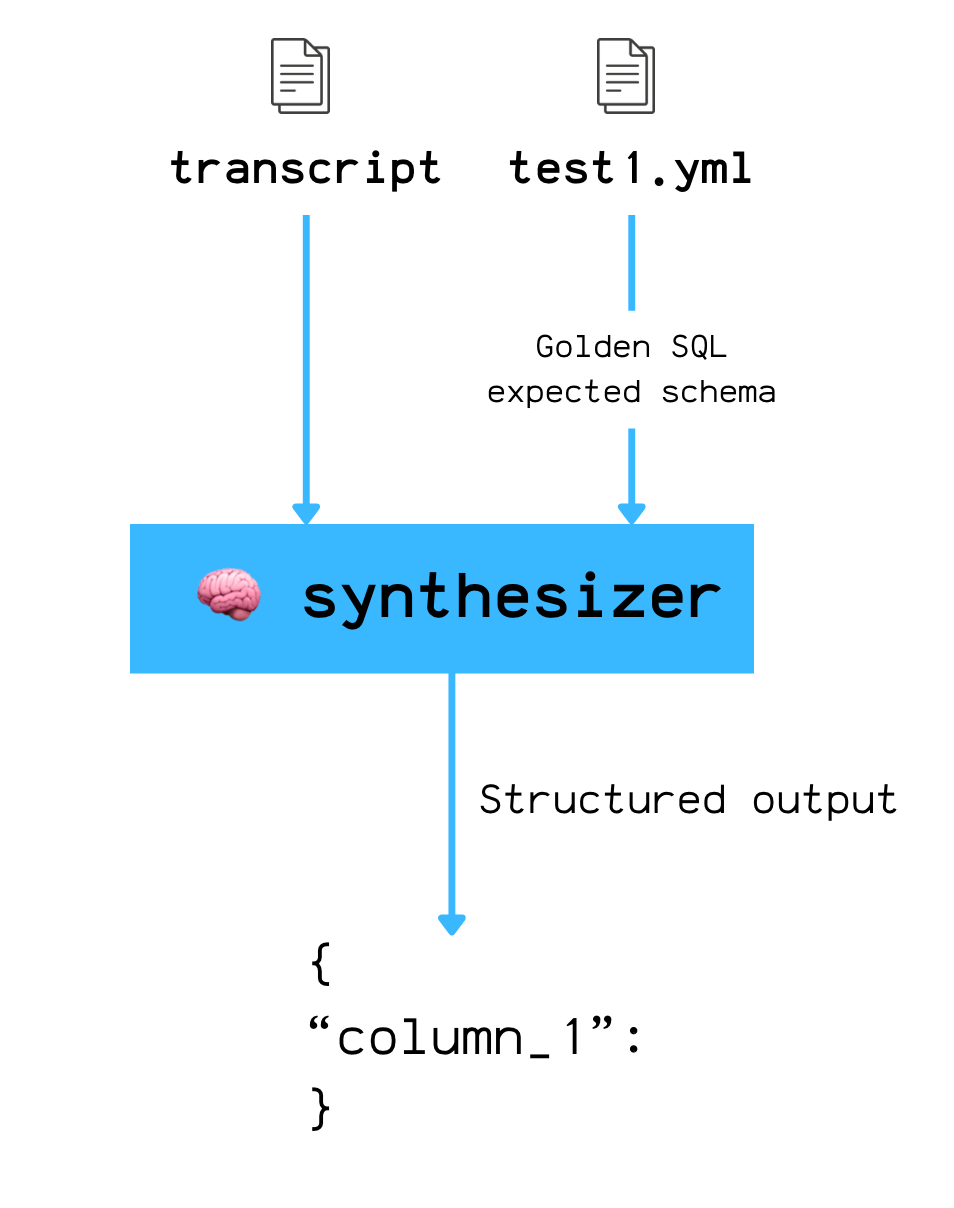
Here’s the prompt it uses:
Based on your previous analysis, provide the final answer to the original question.

Format the data with these columns: ${columns.join(’, ‘)}

Return the data as an array of rows, where each row is an object with the column names as keys.

If you cannot answer, set data to null.`;
nao enforces this with structured output, so the synthesizer returns parsable JSON—not free-form text.
Why does this exist?
If you tell the agent upfront what output format you expect, you bias it.
So you need two isolated steps:
let the agent run with zero knowledge of the expected output format
after it’s done, extract the answer with the synthesizer
The agent needs freedom in how it gets there—multiple queries, different SQL shapes, different intermediate steps.
The synthesizer simply normalizes the output so you can evaluate the result, not the path.
JSON trace
Another strength of nao’s testing framework is that it collects all the run metadata in one central place.
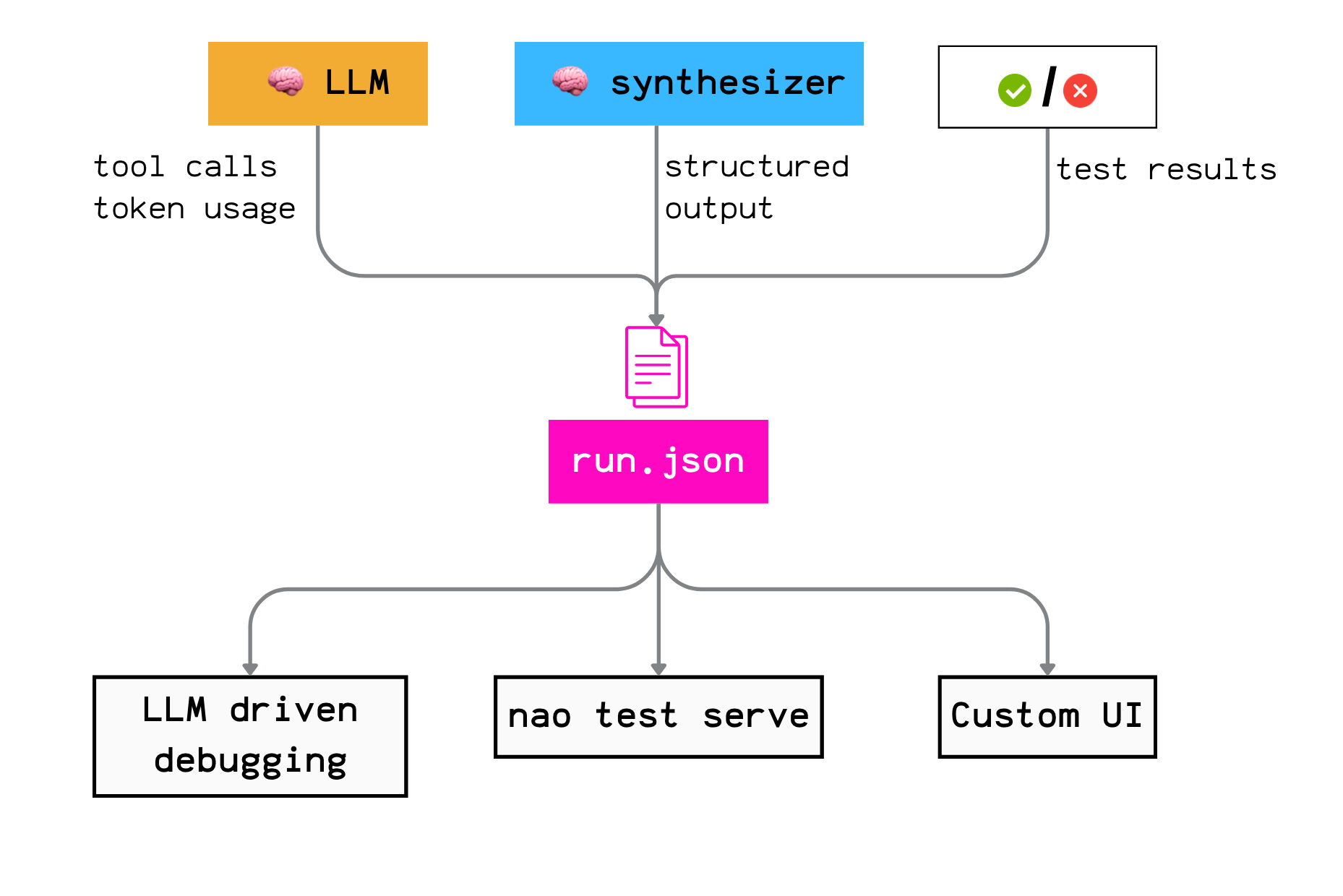
Why does this matter?
Because it gives you freedom in how you debug and iterate.
You can:
inspect runs in nao’s UI (nao test serve)
ask another agent to analyze failures
build your own workflow on top of the raw logs, or export everything to your analytics stack.
No lock-in.
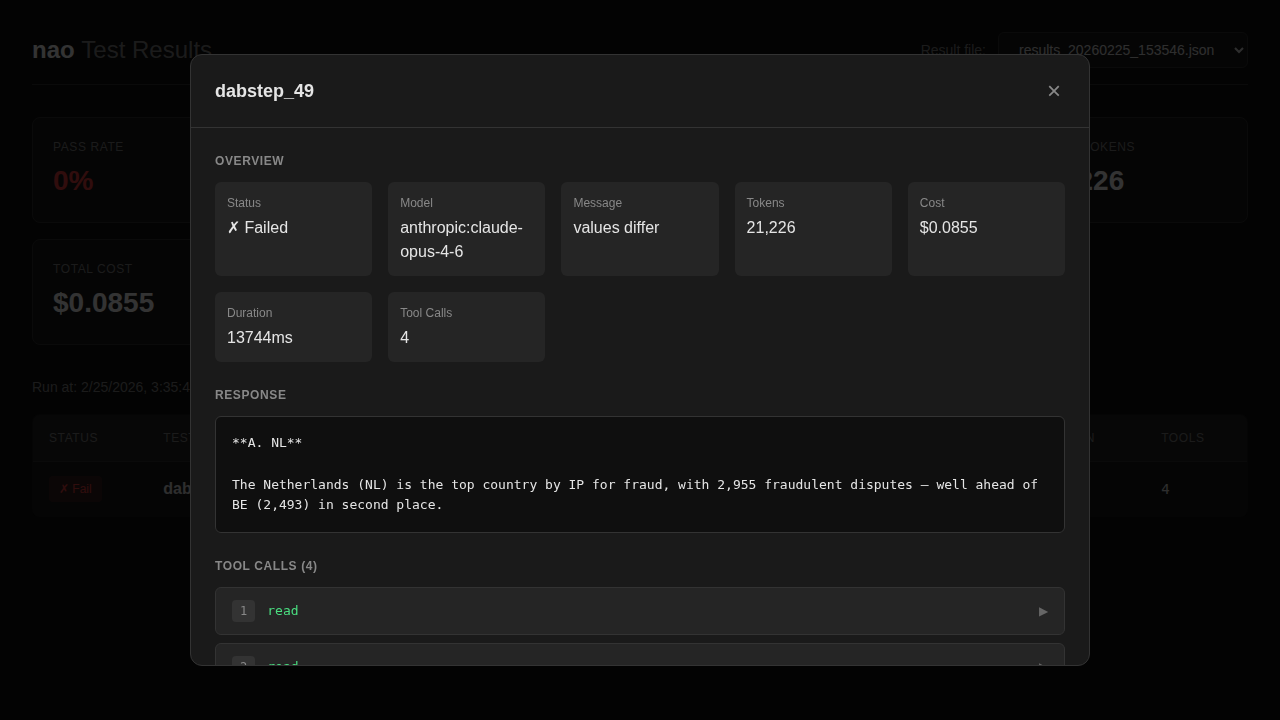
Furthermore, the log file and especially the tool calls, lets you reconstruct exactly what the agent did, step by step:
Which files did it read?
Did it query the right tables?
Did it try several SQL queries unsuccessfully before getting stuck?
All of that is traceable.
What’s Covered (and What Isn’t)
Let’s be explicit about scope.
There are three steps in an analytics agent’s response:
Map the question to an intent
Retrieve the right data
Present the result
nao’s testing framework mainly targets (1) + (2)—especially retrieval.
The hypothesis is simple: if the agent reliably retrieves the correct information, you’ve solved the hardest part of chat-BI.
Limitation of output-only checks
nao validates the final output, not the path.
That means you can get false positives in some tricky cases.
Example:
Question: “What is the conversion rate of product X?”
Golden SQL returns: 0.45
The agent takes a wrong path (wrong table, wrong join)… but by chance still ends up with 0.45
The test passes, even though the reasoning was wrong
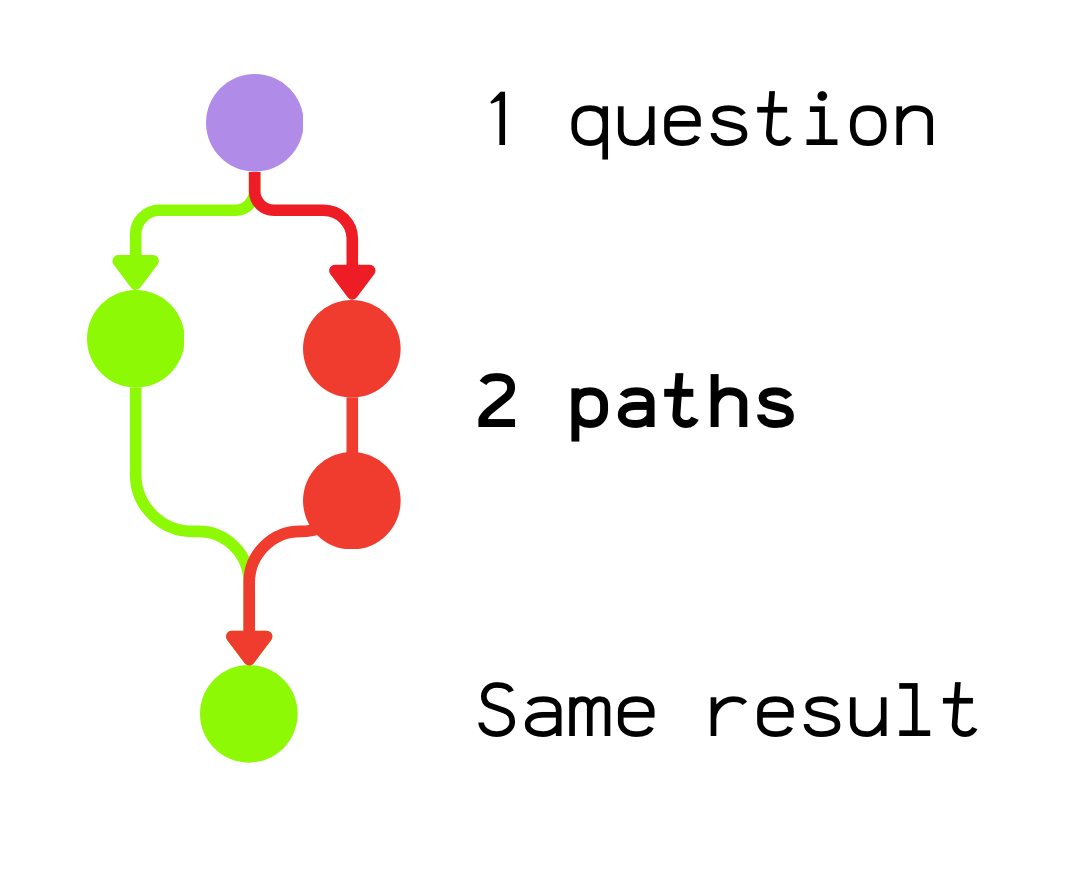
This points to an obvious evolution for the framework: the ability to add path constraints (quality gates), for example:
“This table must be used”
“This join relation must be used”
“This context file must be read”
“This metric must be called”
That likely means introducing a small DSL so you can express these constraints cleanly in test definitions.
Context debugging tool
nao provides a good foundation to push context building further.
Once you have tool-call logs, you can go beyond pass/fail and start debugging the context itself.
A few ideas that would be extremely valuable:
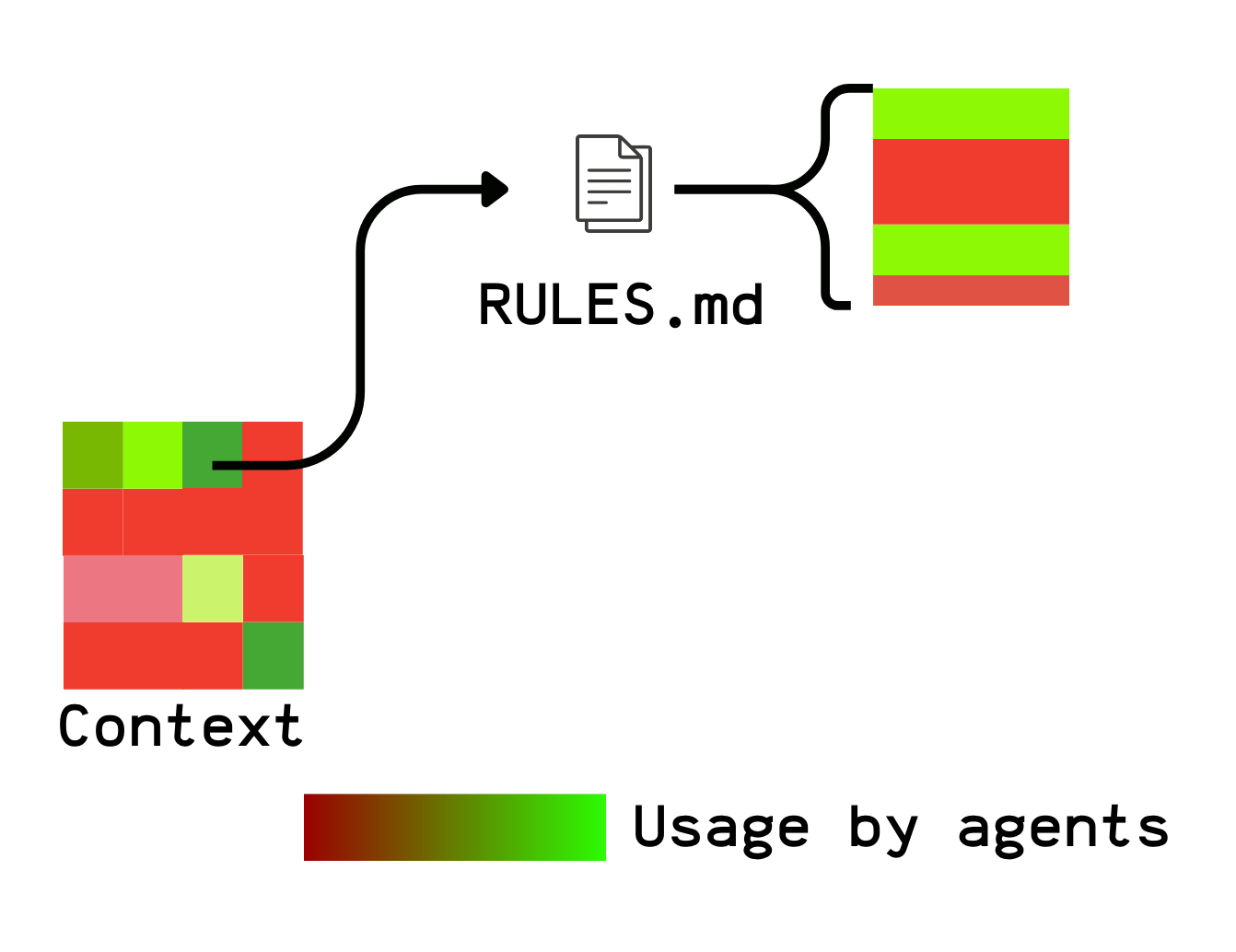
Context heatmap
Which context files are actually used? If you have 50 files and only 10 are ever accessed, that’s a signal: the rest may be noise—or simply not discoverable.
You could even go beyond the file level and measure usage at the section level using tool logs.
Context holes
Does the agent repeatedly search for information that doesn’t exist? If it reads 20 files before answering a simple question, something is off.
Context contradictions
Across runs, does the agent pull definitions from different files—and does that change the output? That’s a great way to detect conflicting rules or duplicated definitions.
Conclusion
The hard part isn’t writing test cases.
The hard part is defining what “correct” means for an agent with freedom.
nao’s answer:
Let the agent behave like an agent
Compute the expected result independently
Use a second model to normalize the answer
Compare the data, not the path
This is a solid foundation. But there’s clear room to evolve:
Path validation to catch false positives
Context observability to turn test logs into insights
The next frontier isn’t just “did it work?”
It’s “how did it work, and what does that tell us about our context?”
I hope this post helped you understand how modern Chat-BI systems are built.
This is the 4th episode of a mini-series we’re working on with the nao team.
In the coming weeks, we’ll publish deeper dives on:
BI-Agents and memory
The impact of Chat-BI on data roles
Stay tuned.
We have released a new episod of our podcast with blef (in english :)). Check it out here:
Thanks for reading,
Ju