
Semantic Layer = Map for Chat-BI Agents
Ju Data Engineering Weekly - Ep 98

Bonjour!
I’m Julien, freelance data engineer based in Geneva 🇨🇭.
Every week, I research and share ideas about the data engineering craft.
Not subscribed yet?
This is the third episode of my chat-BI series with nao.
A quick recap:
Post 1: I explored a modern approach to chat-BI, using the filesystem to store and serve context to the model.

Post 2: I stress-tested that setup on real benchmarks.

We ran 25 questions across BIRD + DABStep.
Out of all the errors, none were SQL errors.
The failures happened before SQL:
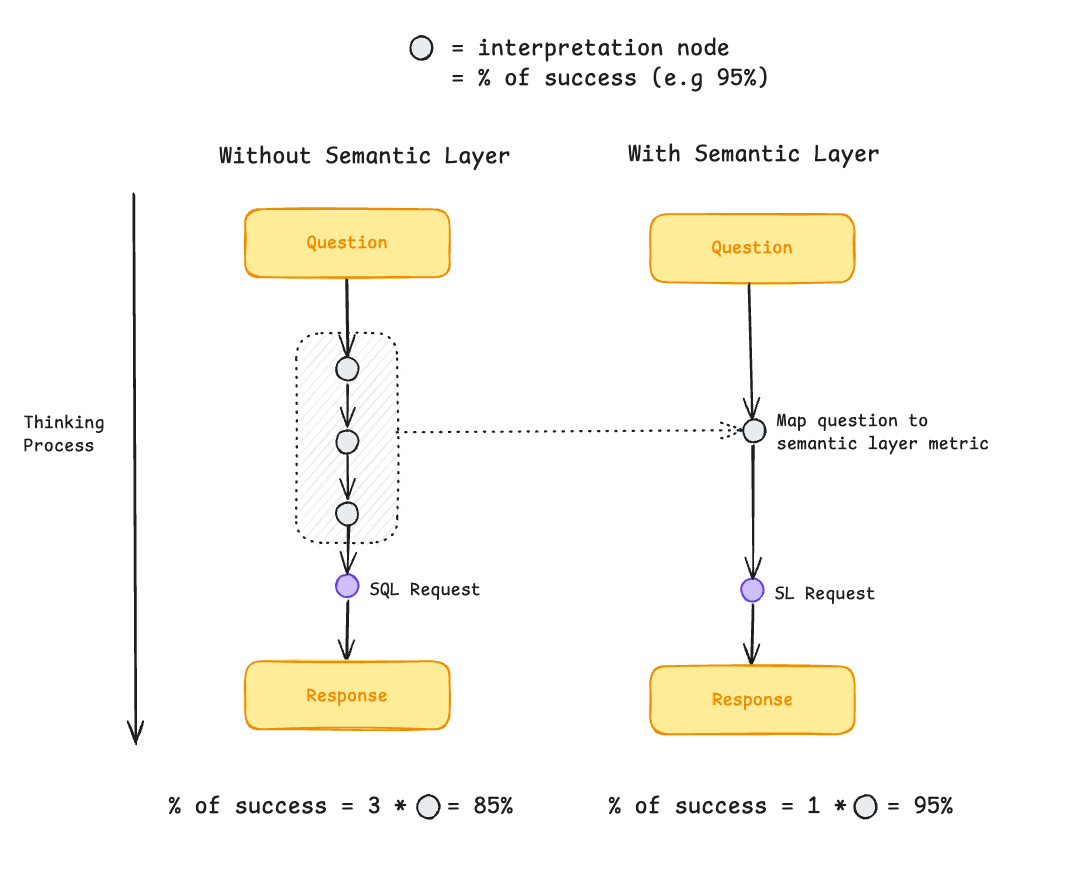
Interpretation: the model misreads metric definitions
Framing: it answers questions that have no answer in the data
Common sense: it misses basic conventions
So where does that leave us?
If context isn’t enough—and RULES.md doesn’t scale—how do we get reliability?
My take: stop asking the model to navigate from scratch. Give it a map.
That’s what a semantic layer is: predefined routes and hard definitions for your metrics.
In this post, we’ll rerun the same benchmarks from Post 2 with a semantic layer in the loop and see which failure nodes disappear—and which ones remain.
Let’s go.
What is a semantic layer ?
Think of a semantic layer as a set of predefined itineraries your agents can pick to navigate your schema.
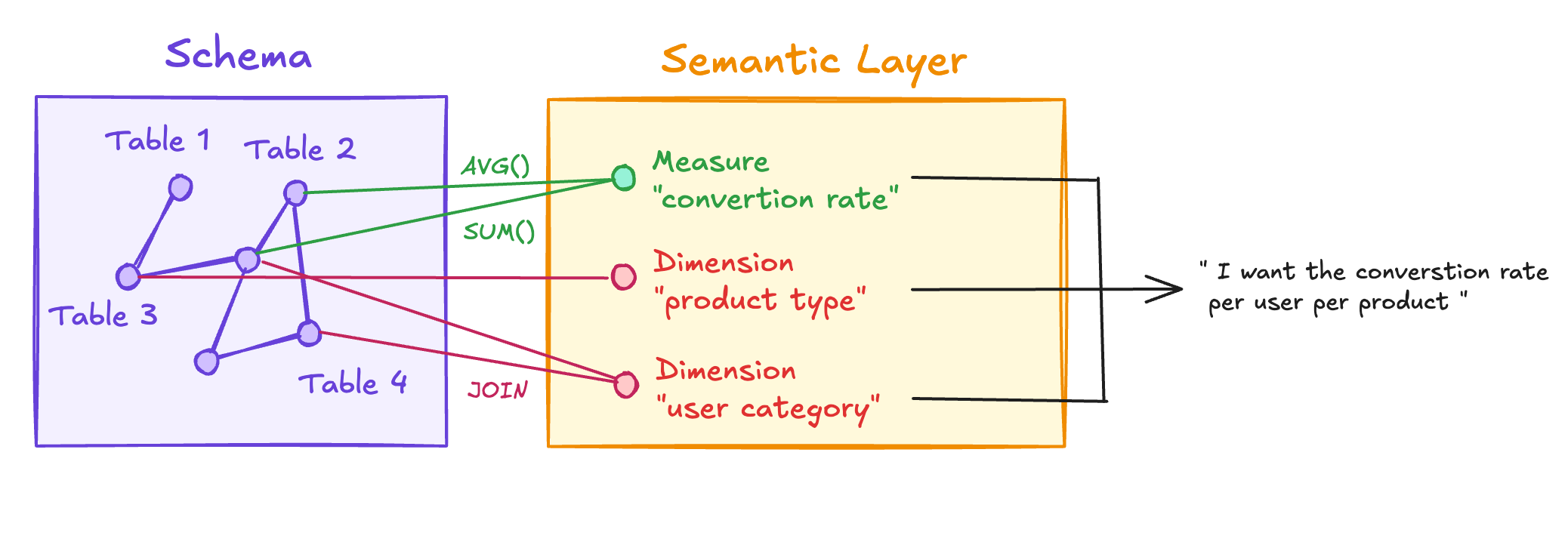
It defines metrics so they can be reused immediately—without having to think about joins, table relationships, or column definitions.
Metrics usually come from combining two things:
Measures are the calculations:
revenue = SUM(amount) WHERE status = ‘completed’
fraud_rate = SUM(CASE WHEN is_fraud THEN eur_amount ELSE 0 END) / SUM(eur_amount)
Dimensions are how you slice those measures: by country, by month, by product category… Same measure, different angles.
Users combine measures × dimensions, and the semantic layer’s job is to generate the corresponding SQL against the underlying database.
BSL?
If you’ve been following my newsletter, you’ve seen BSL before.
If not: Boring Semantic Layer is a lightweight semantic layer built on top of Ibis, that we developed together with Hussain Sultan.
Install is literally:
pip install boring-semantic-layerHow does it work, concretely?
You define measures and dimensions in YAML, and commit them next to your code:
payments:
  table: transactions
  dimensions:
    merchant:
      expr: _.merchant
      description: "Merchant identifier / name"

  measures:
    total_volume:
      expr: _.eur_amount.sum()
      description: "Total monetary volume in EUR"
This YAML can be used directly by an LLM to query data.
Give it the BSL Python library, and it can execute queries like:
bsl.model("payments")
    .group_by("ip_country")
    .aggregate("fraud_rate", "total_volume")
    .execute()
When we designed BSL, composability was a core goal. You can enhance any semantic model in three ways:
One-off post-aggregation transforms (ad hoc calculations)
flights_st
    .group_by("carrier")
    .aggregate("flight_count")
    .mutate(market_share=_.flight_count / _.flight_count.sum().over(w) * 100)
Add new measures and dimensions (promote ad hoc logic into reusable metrics)
flights_st = flights_st.with_measures(
    market_share=lambda t: t.flight_count / t.all(t.flight_count) * 100,
)
Join models together (compose richer semantic models)
flights_with_carriers = flights_st.join_many(
    carriers_st,
    lambda f, c: f.carrier_code == c.code,
)
And the cherry on the cake: there’s no lock-in.
Your LLM can always ask BSL for the raw SQL it generates, then tweak it if needed:
q = payments.group_by("ip_country").aggregate("fraud_rate", "total_volume")
q.sql()
BSL + nao
If you’ve followed the previous episodes, you’ve seen how an LLM can navigate a filesystem to gather context before querying the database.
That’s why a YAML-based semantic layer fits so well here: it’s just another set of files the model can read.
The semantic model stays in the background—an extra context source, not a central platform in your stack.
Your context becomes a clean, version-controlled bundle:
Schema metadata (tables, columns, relationships)
Docs + rules (RULES.md + supporting .md files)
Metric definitions (measures + dimensions in YAML)
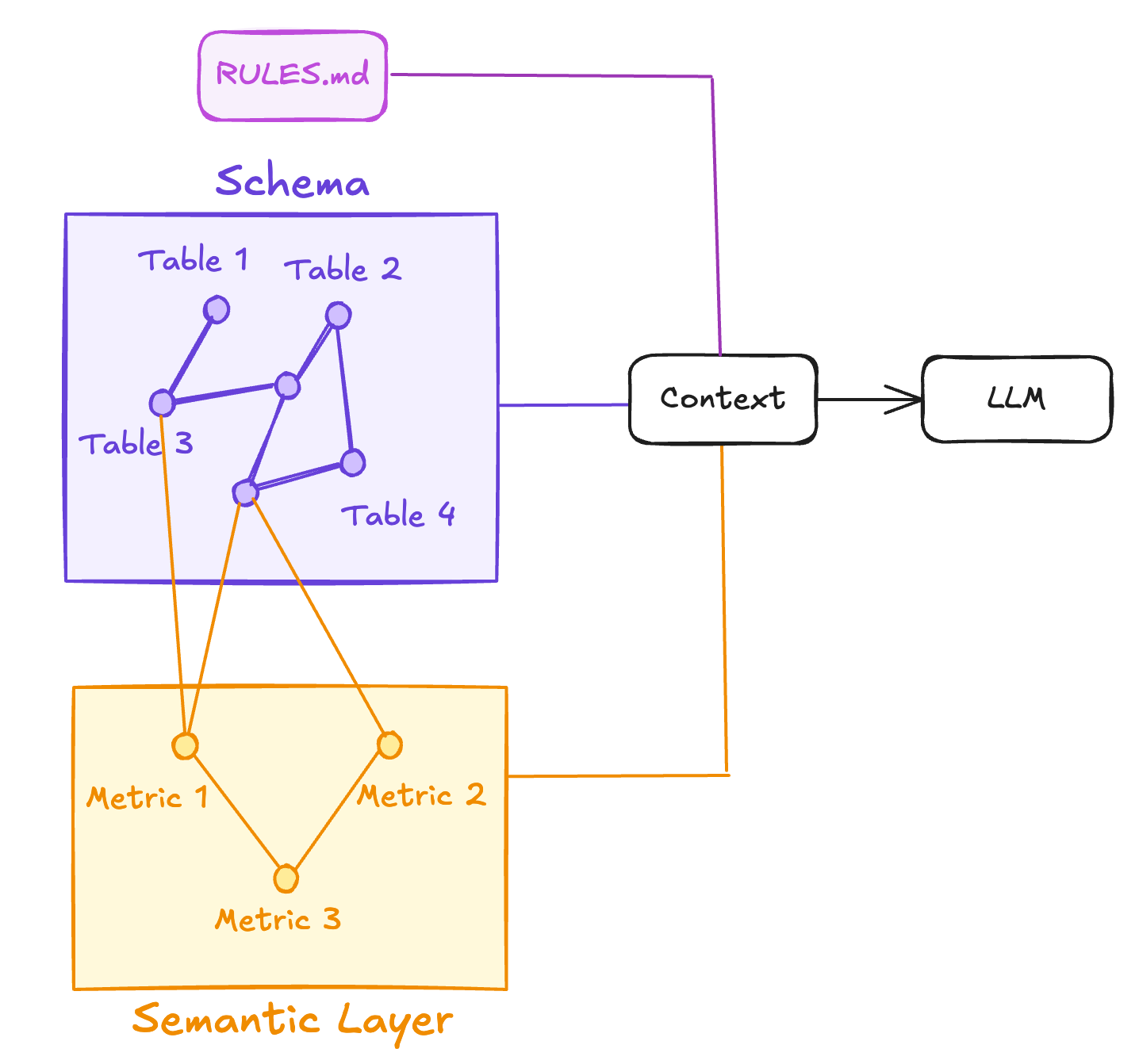
That way, the LLM can navigate different layers of context depending on what the question requires:
RULES.md → metrics (YAML) → schema
Start with high-level guardrails, fall back to metric definitions for business logic, and only drop down to the raw schema when it needs table/column details.
Demo
I took the same nao setup as in the previous episode and added BSL into the mix.
Concretely, I only added two files:
profiles.yaml — DB connection
dabstep_db:
  type: duckdb
  database: "./dabstep.duckdb"
  read_only: true
semantic_model.yaml — dimensions + measures
payments:
  table: payments
  description: "Payment transactions processed by the payment processor. Each row is one transaction with amount, fraud status, and card/country metadata."
  dimensions:
    merchant:
      expr: _.merchant
      description: "Merchant name"
    card_scheme:
      expr: _.card_scheme
      description: "Card scheme: MasterCard, Visa, Amex, Other"
...
  measures:
    transaction_count:
      expr: _.count()
      description: "Total number of transactions"
...
After that, my project looked like this:
dabstep_bsl/
  ├── nao_config.yaml            ← project config (DB + LLM)
  ├── RULES.md                   ← agent instructions
  ├── semantic_model.yml         ← BSL metric definitions
  ├── profiles.yml               ← DuckDB connection config
  │
  ├── docs/
  │   └── manual.md              ← business rules & definitions
  │
  ├── databases/                 ← schema metadata (nao context)
  │   └── type=duckdb/database=dabstep/schema=main/
  │       ├── table=payments/
  │       ├── table=fees/
  │       ├── table=merchants/
  │       └── ...
I finished by adding a small note in RULES.md:
...
## Semantic Model
We use `boring-semantic-layer` for canonical metric definitions (`semantic_model.yml` + `profiles.yml`).

Use sandboxed execution to run BSL queries like:

```python
from boring_semantic_layer import from_yaml

models = from_yaml("semantic_model.yml", profile="dabstep_db", profile_path="profiles.yml")
payments = models["payments"]

df = (
    payments
    .filter(lambda _: _.is_credit == True)
    .group_by("card_scheme")
    .aggregate("transaction_volume")
    .execute()
)
df
...
And enabling two things in nao:
Sandboxed Python execution

With nao’s sandboxes, the agent can safely run BSL queries in a safe runtime—no raw eval().
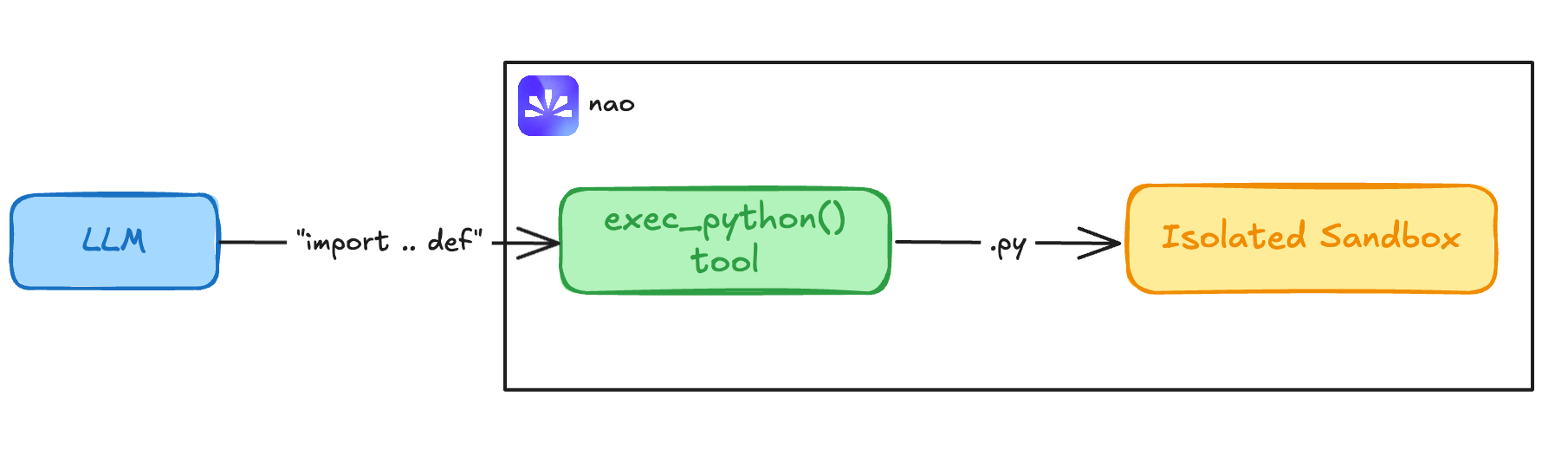
Web search (so it can look up BSL docs when needed)

Then I ran a quick smoke test in nao chat: nao’s agent automatically understood it needed to install BSL inside its sandbox.
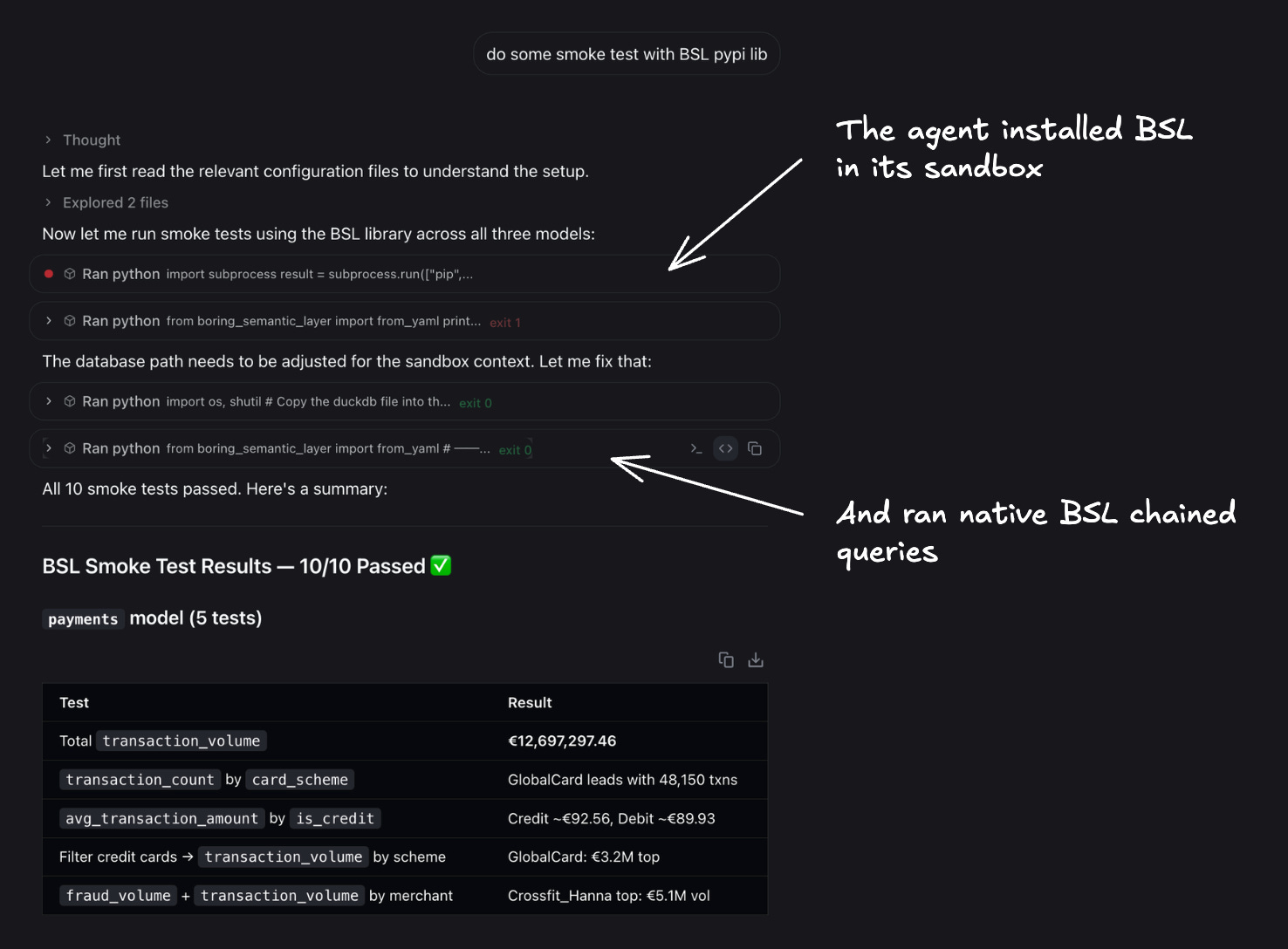
Now let’s go back to the two questions that broke the system in Post 2 and see what happens this time.
Test 1: Interpretation failure
In Post 2, we asked:
What is the top country (ip_country) for fraud?
The agent used COUNT(*) instead of SUM(eur_amount).
I added there fore a metric in BSL:
fraud_rate:
    expr: (_.has_fraudulent_dispute.cast("int64") * _.eur_amount).sum() / _.eur_amount.sum()
And the model picked it up directly:
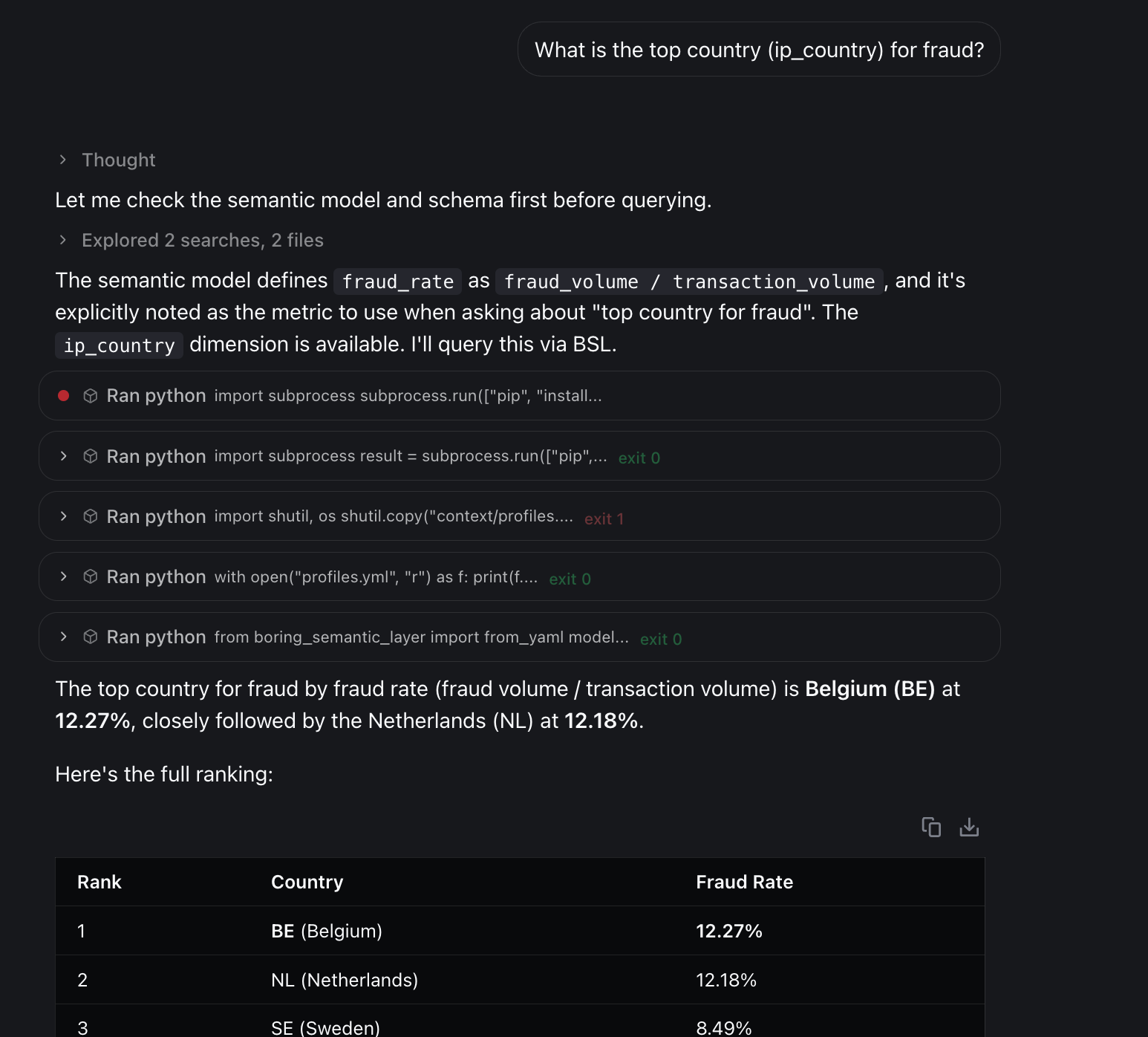
One metric call. No interpretation. Correct answer: BE.
And that’s the biggest advantage of a semantic layer for me: it reduces the number of failure nodes and makes chat-BI agents much more reliable.
Test 2: Framing failure
In Post 2, we asked:
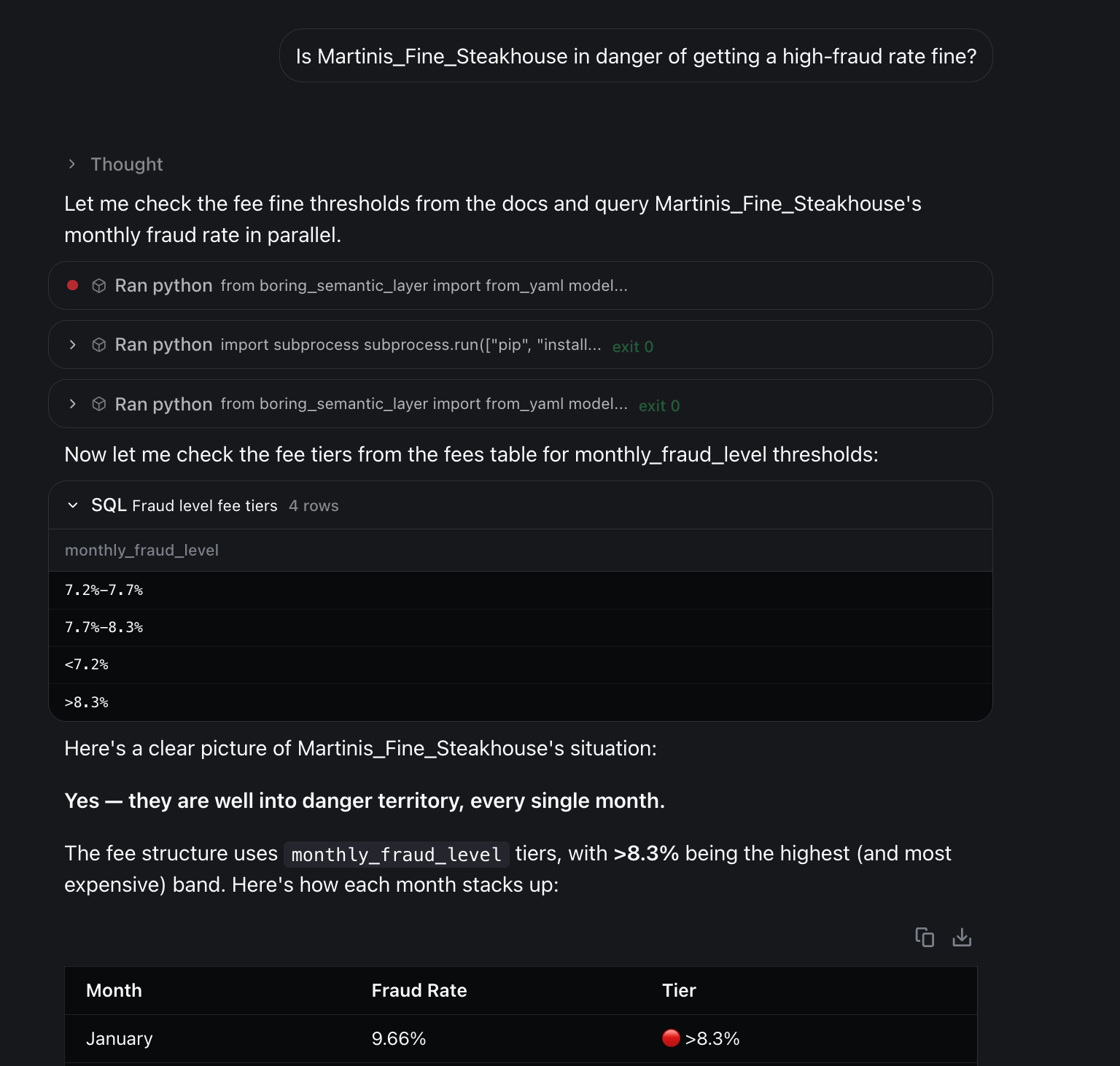
Is Martinis_Fine_Steakhouse in danger of getting a high-fraud rate fine?
The expected answer was “Not Applicable”—no such concept exists in the data.
But the agent invented a definition and answered “Yes.”
With the semantic layer we had the same problem:
I tried tightening RULES.md with a stricter decision policy:
Prefer BSL: if the metric exists in semantic_model.yml, use it.
If it’s not in BSL: decide whether it’s in-scope but undefined (ask for confirmation) or out-of-scope (answer “Not Applicable”).
But it still didn’t reliably work.
So framing errors remain an open problem for me.
The missing piece is a stronger grounding mechanism—something that forces the agent to prove a concept exists before answering.
Rules.md vs Semantic Layer
So when do you add a rule to RULES.md, and when do you define a metric in the semantic layer?
My rule of thumb:
Use RULES.md for behavior: how the agent should think, what to read first, how to answer, what not to invent, how to handle ambiguity. Keep it short—guardrails, not business logic.
Use the semantic layer for definitions: anything that must be precise and reusable—metric formulas, filters, time windows, what “volume” means, what counts as fraud, etc.
In practice:
Start with basic context + a handful of core metrics.
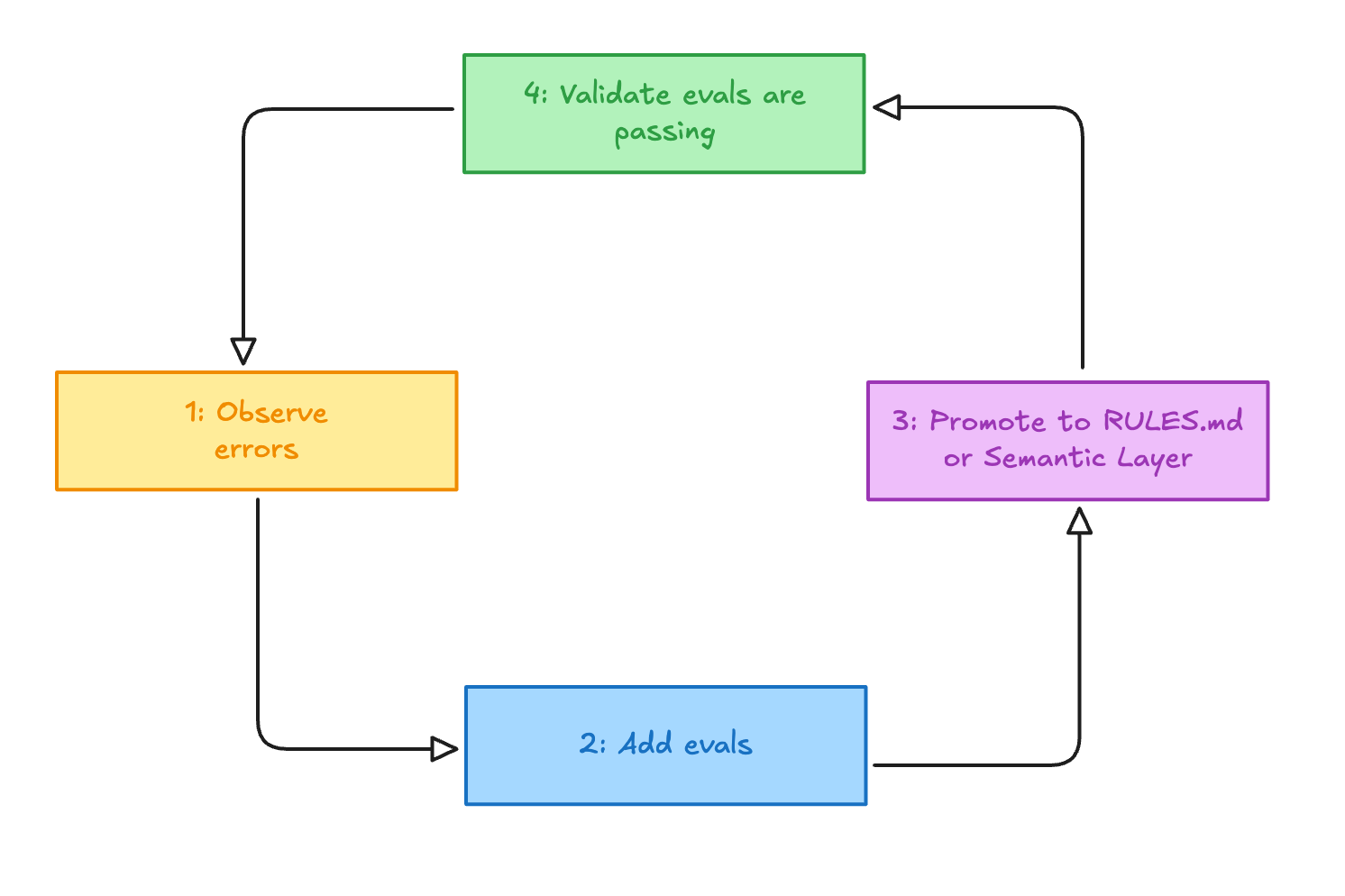
Ship, log failures, and turn recurring errors into eval questions.
If an interpretation issue keeps repeating (“volume”, “active”, “churn”), promote it into the semantic layer.
Guidance = RULES.md
Contract = semantic layer
Rerun eval and refine metric names/descriptions until selection is stable.
This loop—observe → eval → promote → validate—keeps RULES.md lean, grows the semantic layer with real usage, and prevents context drift.
This was episode 3 of a mini-series with the nao team on chat-BI architectures and design patterns.
Next episode: what chat-BI changes for data roles (analytics, BI, analytics engineering, and data platform).
We have released a new episode of our podcast with blef (in french). Check it out here:
Thanks for reading,
Ju